
SaaS Facebook Ads: A Step-by-Step Funnel Guide for 2026
Plan SaaS Facebook ads step by step: funnel stages, benchmarks, creative angles, targeting and how to measure real demand when platform numbers shift.
Meta generated $160.633 billion in advertising revenue in 2024, up 22% from 2023, with advertising accounting for approximately 97.7% of its total revenue, according to Meta’s 2024 annual results. That platform-wide scale doesn’t prove Facebook ads will work for your SaaS product. It does explain why the channel deserves a measured test, and why the key question isn’t whether Meta can deliver conversions, but whether those conversions become incremental, valuable customers.
Table of Contents
- SaaS Facebook Ads Benchmarks to Plan Around
- How to Build a Three-Stage Facebook Funnel
- Creative Angles That Sell Software
- Audience Targeting for Cold and Warm Traffic
- Proving Incremental Demand With a Holdout Test
- Scale, Pause or Hold Spend When Numbers Disagree
- Confirm the Next Test Before You Scale Spend
SaaS Facebook Ads Benchmarks to Plan Around
A new SaaS account is easy to judge against whatever number someone finds online. Without a baseline, one weak week can trigger a budget cut before the team has enough evidence to diagnose the problem. Benchmarks offer a starting point, not a verdict.
The table below summarizes a 2026 industry benchmark based on managed accounts. Performance varies with product price, sales cycle, audience, creative, attribution window, and conversion type. A demo request for an enterprise product and a free-trial sign-up are different outcomes, so they shouldn’t share one benchmark. The 2026 SaaS Facebook ads benchmark is useful for planning, but your own funnel and CRM must decide what counts as success.
Facebook ad benchmarks for SaaS planning
| Metric | Benchmark | How to use it |
|---|---|---|
| Average monthly Facebook ad spend, B2B SaaS | $758 | Starting point for a test budget, not a target |
| Average monthly Facebook ad spend, B2C SaaS | $1,810 | Shows how much heavier consumer SaaS spend runs |
| Average monthly Facebook ad spend, all SaaS | $1,169 | Blended reference across SaaS categories |
| Average Meta cost per lead | $94 | Ceiling check when a sign-up or demo request is the goal |
| Landing-page conversion, B2B SaaS | 2.5%–4.0% | Below this range, fix the page before adding budget |
| Landing-page conversion, B2C SaaS | 3.0%–6.0% | Higher range fits low-friction free trials |
| Conversion rate, cold audiences | 3.2% | Directional reference for prospecting campaigns |
| Conversion rate, retargeting | 7.8% | Warm audiences converted at more than twice the cold rate |
| Cost per lead, retargeting versus cold | 45% lower | Reason to give warm audiences early budget |
Read the table as a set of diagnostic prompts. If your landing page converts below the relevant range, inspect the message match, form friction, page speed, and trust signals before raising spend. If you have qualified site visitors or engaged prospects, retargeting can be a sensible place to put the first dollars, rather than asking cold audiences to convert immediately.
Use the right ad performance metrics for each stage. A low cost per lead can hide weak activation or poor sales qualification; a higher-cost demo can still be worthwhile if it produces qualified pipeline. Compare like with like: a trial start, activated trial, qualified opportunity, and paid subscription each tell you something different.
How to Build a Three-Stage Facebook Funnel
Build the campaign around the customer action you want, then give Meta and your CRM consistent signals. A simple funnel is easier to interpret than a crowded account full of overlapping ad sets.
-
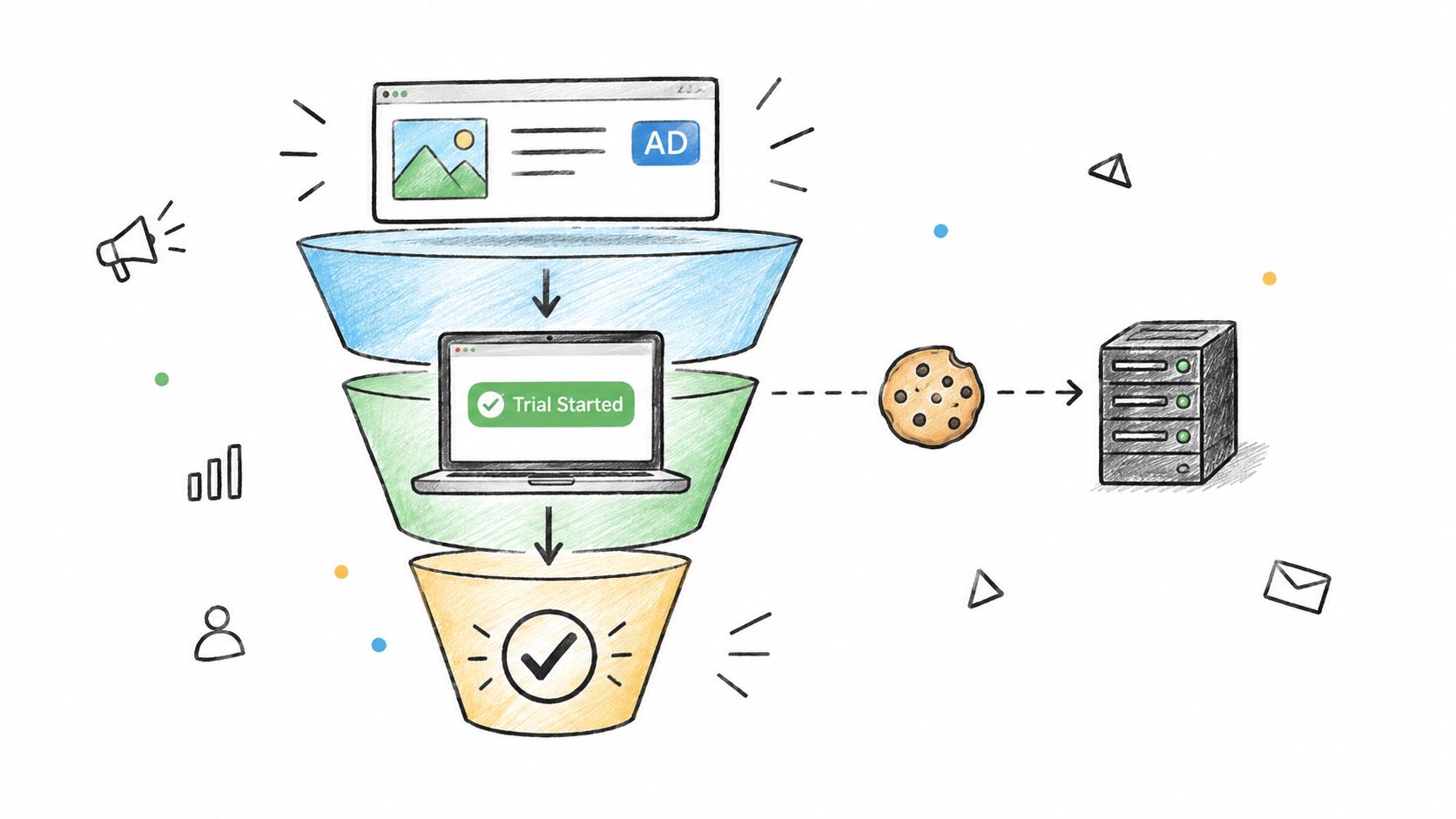
Choose one primary conversion. Use an event tied to a real SaaS outcome, such as a trial start or booked demo, instead of a generic lead form submission. The event should match the offer and the path a buyer takes. Common slip: optimizing for a convenient event that doesn’t predict customer value.
-
Set up reliable event measurement. Install the Meta Pixel and server-side Conversions API, then check in Events Manager that trial-start events are arriving and matching correctly. If your CRM can send qualified outcomes reliably, use those signals to make optimization more relevant. A practical Conversions API gateway guide can help teams think through the server-side setup. Common slip: assuming a browser event is complete just because it appears once.
-
Create a cold prospecting ad set. Target people who fit your ideal customer profile, use a clear problem or outcome in the creative, and exclude current customers. Keep the audience and offer broad enough to gather meaningful conversion feedback. Common slip: combining several distinct buyer types into one ad set before you know which message fits each.
-
Build two warm audiences. Retarget site visitors from the last 30 days who didn’t start a trial, and separately reach people who started a trial but didn’t activate. Give each audience a message for its next decision, such as seeing a workflow or completing onboarding. Common slip: showing trial users the same acquisition ad they already acted on.
-
Reserve room for learning. A workable initial split is roughly 60% for cold prospecting, 30% for retargeting, and 10% for new creative tests, then adjust as the funnel fills. For ideas on structuring offers and follow-up, use a social lead playbook for growing businesses as a planning resource, not as a substitute for measuring lead quality. Common slip: spending the whole budget on one untested message.
-
Keep the structure lean. Before resuming a new ad set, check whether it can plausibly generate about 50 optimization events in seven days. Splitting one audience across too many ad sets leaves each with too little signal; a $1,000 monthly test with two ad sets is more useful than eight ad sets funded at $125 each. Common slip: multiplying ad sets because the interface makes it easy.
Creative Angles That Sell Software
The buyer’s first question should determine the ad angle. Someone who doesn’t recognize the problem needs a different message from a prospect comparing products or a trial user who needs help getting value. Show the part of the software that answers that question, not every feature you’re proud of.
| Creative angle | Best funnel stage | Works best when | Watch for |
|---|---|---|---|
| Problem-first static image | Cold prospecting | The pain is clear in one sentence | Looks like generic stock advertising |
| Product screen recording | Consideration | Setup or results are visual, such as dashboards or workflows | Dense interfaces lose viewers in the first two seconds |
| Founder talking to camera | Cold and warm | The founder is known in the niche | Scripted delivery drops quality fast |
| Customer result with a number | Consideration | You have a named customer and a measured outcome | Unverifiable claims cause rejections and distrust |
| Side-by-side with spreadsheet or manual process | Cold prospecting | Buyers currently use a manual workaround | Can read as attacking a competitor |
| Free template or calculator offer | Top of funnel | The product has a genuinely useful free asset | Attracts users who never fit the paid plan |
For screen recordings, make the outcome legible quickly. A short sequence showing an input, a workflow, and the result usually beats a tour of every navigation tab. Customer proof works best when the claim is specific, documented, and easy to connect to the product. Don’t put a number in an ad just because it sounds convincing; make sure you can substantiate it.
Test three to four creative angles per product message and put the hook in the first three seconds. Use the Facebook video ad examples for format inspiration, then adapt the execution to your own buyer and offer. Retire a creative when frequency climbs while click-through falls, but check conversion quality before deciding that the replacement is automatically better. A new ad can earn more clicks and still bring in weaker prospects.
Audience Targeting for Cold and Warm Traffic
For many SaaS teams, the most useful audience starts with first-party customer or product data. A list of trial users, activated accounts, or paying customers lets you separate people who merely showed interest from those who reached a meaningful outcome. Build cold targeting around the profile of good customers, then use warm audiences to address the next step.
Useful audience sources include:
- CRM lists: Upload trial users, paying customers, and churned accounts when the segments have distinct messages. Keep customer acquisition ads away from current users.
- Website visitors: Segment by page. Someone who visited pricing is generally closer to a decision than someone who read a broad educational blog post.
- Page and video engagers: Use people who interacted with your Facebook page or watched your videos to build a warm pool for follow-up.
- Lookalikes: Build from paying customers rather than an undifferentiated signup list. A source list of about 100 paying customers is a practical minimum for a first test, but the seed’s quality matters more than a large count of weak leads.
A lookalike is a starting signal, not proof that the people it reaches will buy. Compare it with broad targeting, especially when your conversion event and creative can do the filtering. For a mid-market product, detailed interest targeting can add restrictions without adding useful intent. This Scéaled Meta Ads targeting guide is a useful reference when you’re deciding how to combine audience sources and exclusions.
Apply exclusions deliberately:
- Current customers: Avoid paying to acquire people who already use the product.
- Recent converters: Exclude people who completed the target action in the last 30 days, unless you’re running a separate onboarding or expansion message.
- Employees and competitors: Exclude them where they could distort delivery or produce irrelevant engagement.
Judge cold audiences on cost per trial, not immediate paid conversions. The trial cohort needs time to activate and progress through your sales or product journey; a cold campaign can look weak on last-click revenue while still creating qualified demand. Keep the next step in view, and use CRM outcomes to decide whether the leads are actually worth pursuing.
Proving Incremental Demand With a Holdout Test
Meta can claim a conversion that might have happened anyway because of organic demand, brand familiarity, or another channel. That makes platform attribution useful for campaign management but insufficient as proof that the ads created new SaaS demand.
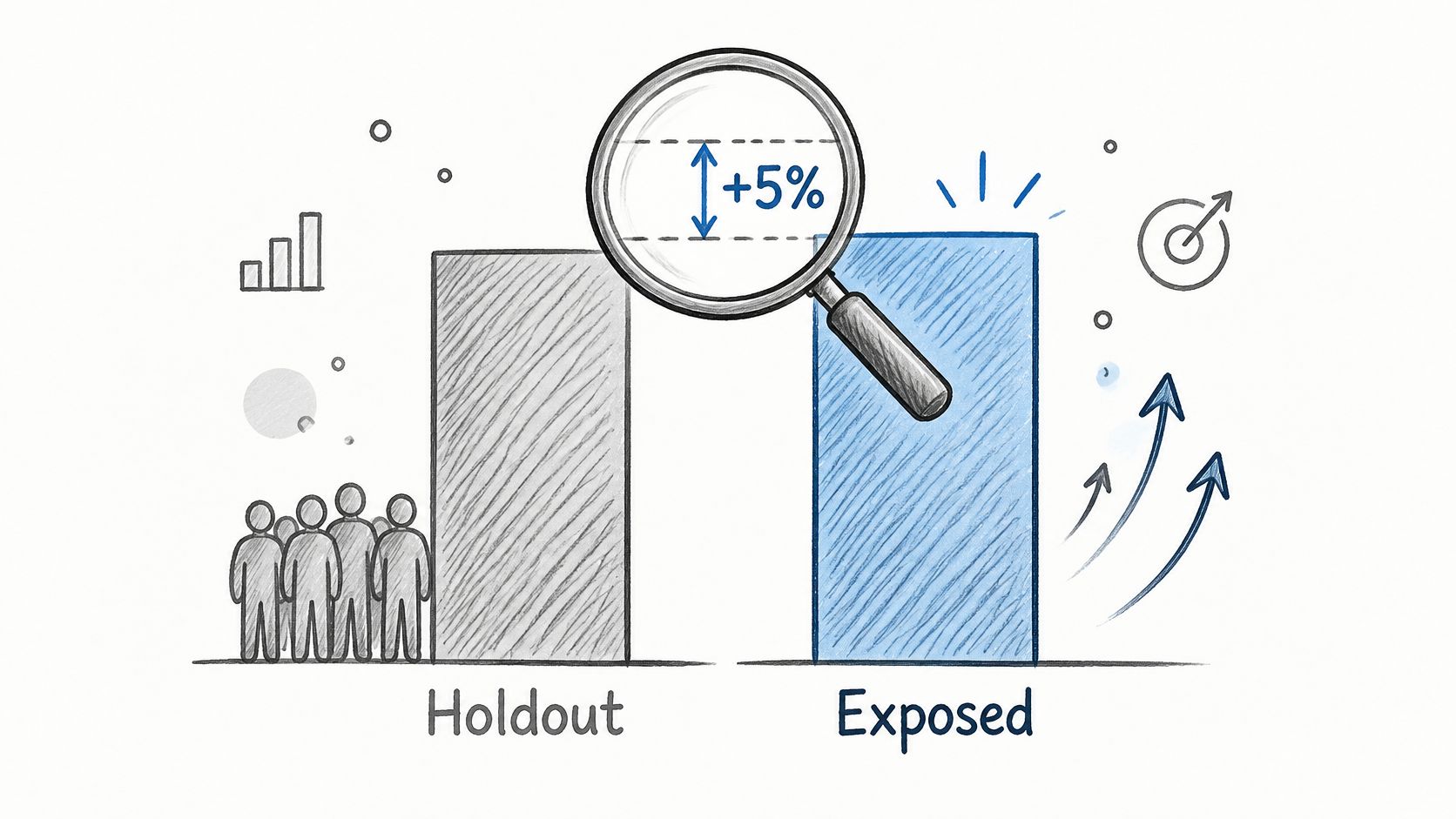
The stronger approach is a randomized Conversion Lift-style holdout test. The Meta incrementality testing guide describes the core design: define an eligible audience, randomly assign users to an exposed group or an ad-suppressed control group, and compare their conversion rates during the campaign and any planned observation period. The control group must remain free of the campaign, and exclusions must stay consistent.
Design around the outcome that pays
Choose an outcome that matches SaaS economics, such as an activated trial, qualified opportunity, or paid subscription, rather than relying on a pixel lead alone. Set the minimum detectable effect and confidence level before launch, and report confidence intervals when interpreting the result. Keep budget, audience, and conversion definitions steady throughout the test so you’re comparing the same conditions.
Meta’s lift framework can use web, app, offline, and custom conversion signals. CRM-qualified outcomes can be more useful than form fills when event quality and identity matching are reliable. If a team is still building server-side event coverage, a well-configured Conversions API gateway can support more complete measurement.
For example, suppose 45,000 exposed users convert to trial at 2.4%, while 5,000 control users convert at 1.9%. The difference is 0.5 percentage points, equivalent to about 225 incremental trials when applied to the exposed group. If 18% of those trials pay and the first-year contract value is $1,200, that implies about 40.5 expected paying customers and $48,600 in incremental value before accounting for margin.
That works out to roughly $216 in incremental value per trial or $1,200 per expected paying customer before margin. Apply contribution margin before setting the allowable acquisition cost, then keep the cost ceiling below the resulting value per incremental customer. The calculation is a decision aid, not a promise: use your own observed conversion and margin inputs, and don’t scale on a lift estimate that the test cannot support.
Scale, Pause or Hold Spend When Numbers Disagree
A falling cost per lead can look like a win while trials, qualified pipeline, and paid conversion stay flat. In that situation, cheaper leads may reflect lower intent or a changed event definition, not improved acquisition. Compare SaaS campaigns with the right baseline: recent benchmark coverage reports SaaS and cloud advertisers averaged a 1.40% CTR, $2.02 CPC, and $80.08 cost per lead from July 2025 to July 2026, compared with broad-market averages of 2.04%, $1.05, and $44.10, respectively, in Facebook advertising benchmark coverage.
Attribution definitions can change what the dashboard reports. Meta has changed how it credits non-link interactions and engaged views, so check the current attribution settings in Ads Manager before comparing periods. If you compare periods without accounting for a definition change, the trend may describe a measurement shift rather than a performance shift.
Keep an account-level measurement change log with the change date, the definition that changed, and the metrics affected. Store Meta’s reported result alongside CRM-qualified pipeline, trial-to-paid performance, cohort payback, and blended CAC. Growth teams studying paid acquisition scaling for growth-stage leaders should still keep cohort and pipeline evidence beside platform metrics before raising spend.
| Signal | What it likely means | Action |
|---|---|---|
| Cost per lead falls, trials stay flat | Lead quality or definition change, not growth | Hold spend and audit lead quality for two weeks |
| Trials rise, paid conversions flat for 30 days | Wrong conversion event or weak onboarding | Stop scaling and optimize toward activated users |
| Holdout lift positive and payback within target | Ads add demand beyond organic | Raise budget in steps of about 20% |
| Platform ROAS strong, CRM pipeline weak | Modeled credit overstates Meta | Hold budget and compare cohort payback |
| Attribution or event definition changed this period | Metrics no longer comparable | Log the change and freeze budget decisions until comparable |
Treat the table as decision discipline. A lower CPL needs support from qualified opportunities in the CRM. Strong platform ROAS needs cohort payback that clears your target. The reverse also matters: when a controlled lift test or mature cohort supports the campaign, a lagging dashboard metric alone should not trigger a cut.
I’d rank evidence in this order before changing budget: incremental lift, CRM-qualified outcomes, cohort payback, then platform-reported efficiency. Move budget only when the higher-quality evidence confirms the signal and payback meets your target. If the measurement definition changed, wait for a comparable window before making a large move. When evidence is incomplete or contradictory, hold spend and investigate rather than reacting to a single platform number.
Confirm the Next Test Before You Scale Spend
Run this checklist with the account owner and a CRM export before changing budgets:
- Confirm the event: It should represent a SaaS outcome, such as trial start, activated user, or booked demo.
- Check the landing page: If conversion falls below the relevant benchmark for your model, fix the page before adding budget.
- Review measurement changes: Log any attribution or event-definition change since the last review.
- Verify incrementality: Confirm a holdout test is running or schedule one before scaling.
- Set decision thresholds: Write down scale, hold, and pause rules, including a roughly 20% budget step and your payback target, before touching spend.
AdCrunch can keep a change record for each account; every agent change appears on the Activity page with the account, what changed, who requested it, and whether it worked. New Meta campaigns, ad sets, creatives, and ads the agent builds start paused and spend only after a separate request to resume them.
AdCrunch connects ad accounts to AI agents so teams can query performance and direct Meta campaign changes with an activity record of what happened. If you’re ready to make your SaaS Facebook ads easier to manage and audit, visit AdCrunch.